December 2025 Monthly Release
For help upgrading to the latest version, contact your Cloudhouse Representative. The following table describes each component available to upgrade within this release of Cloudhouse Guardian (Guardian). For more information on the known issues currently present within Guardian, see Known Issues.
Tip: To access a more simplified view of the changes included within this release, see December 2025 Changelog.pdf.
| Release Date | Guardian Platform | Guardian Web | Linux Agent |
|---|---|---|---|
| 4th December 2025 | V4 | V3.61.0 | V5.49.0 |
Guardian Web Application V3.61.0
Here's what's included in V3.61.0 of the Guardian web application as part of the November 2025 monthly release.
New Features
The following new features are included within this release of the Guardian web application.
Bulk Approve Changes Within Change Report
We have made improvements to the process of approving changes within the Change Report tab (Reports > Change Report), enabling faster change approvals in bulk. Previously, there was a limit of 50,000 records that could be approved at a time. With this new update, the limit has been removed, and you can now use the removed the 50,000 record limit.
Bulk Unignore Changes Within Change Report
As part of this release, a new 'Unignore Changes' option has been added to the Approve Changes drop-down list on the Change Report tab, now enabling you to both ignore and unignore changes directly within the Change Report tab.
Tip: For more information on the Change Report tab, see Change Report.
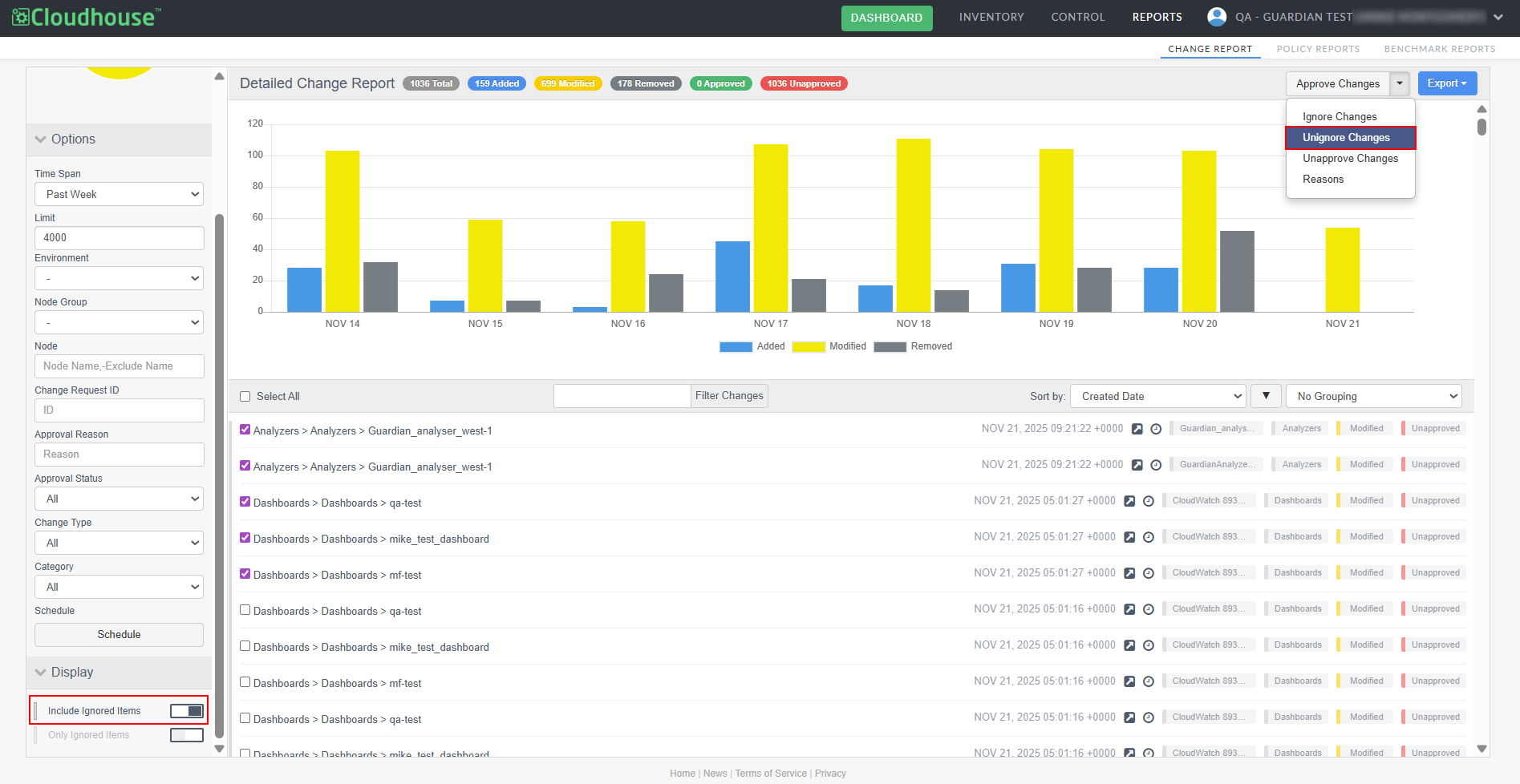
You can now select multiple ignored items and restore them in a single action, eliminating repetitive steps and reducing page reloads. This new feature saves time when managing large sets of ignored items and streamlines change management workflows.
To unignore multiple changes within the Change Report tab, complete the following steps:
-
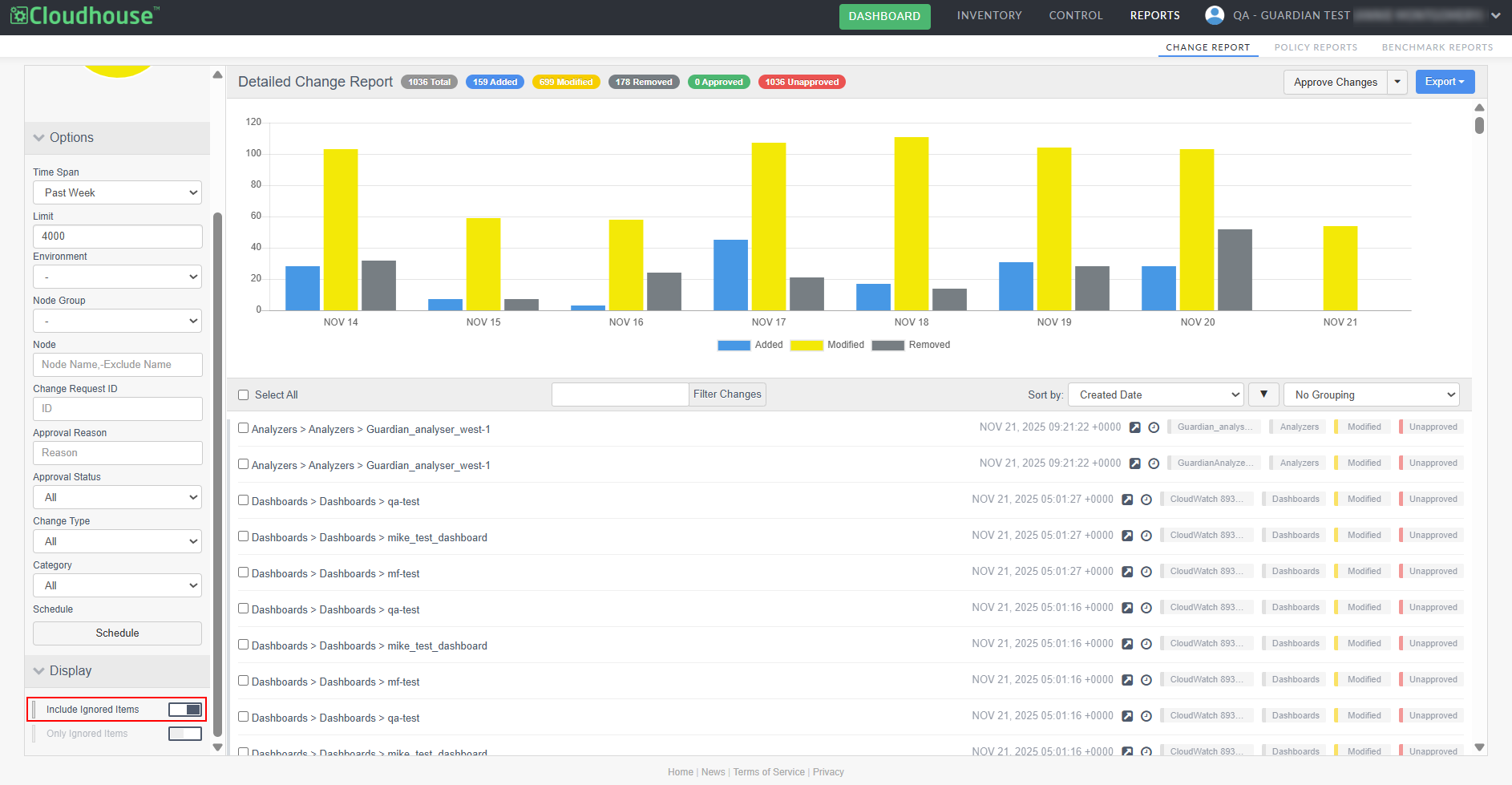
In the Display drop-down menu, click the Include Ignored Items option. A list of the ignored changes within the report are displayed.
-
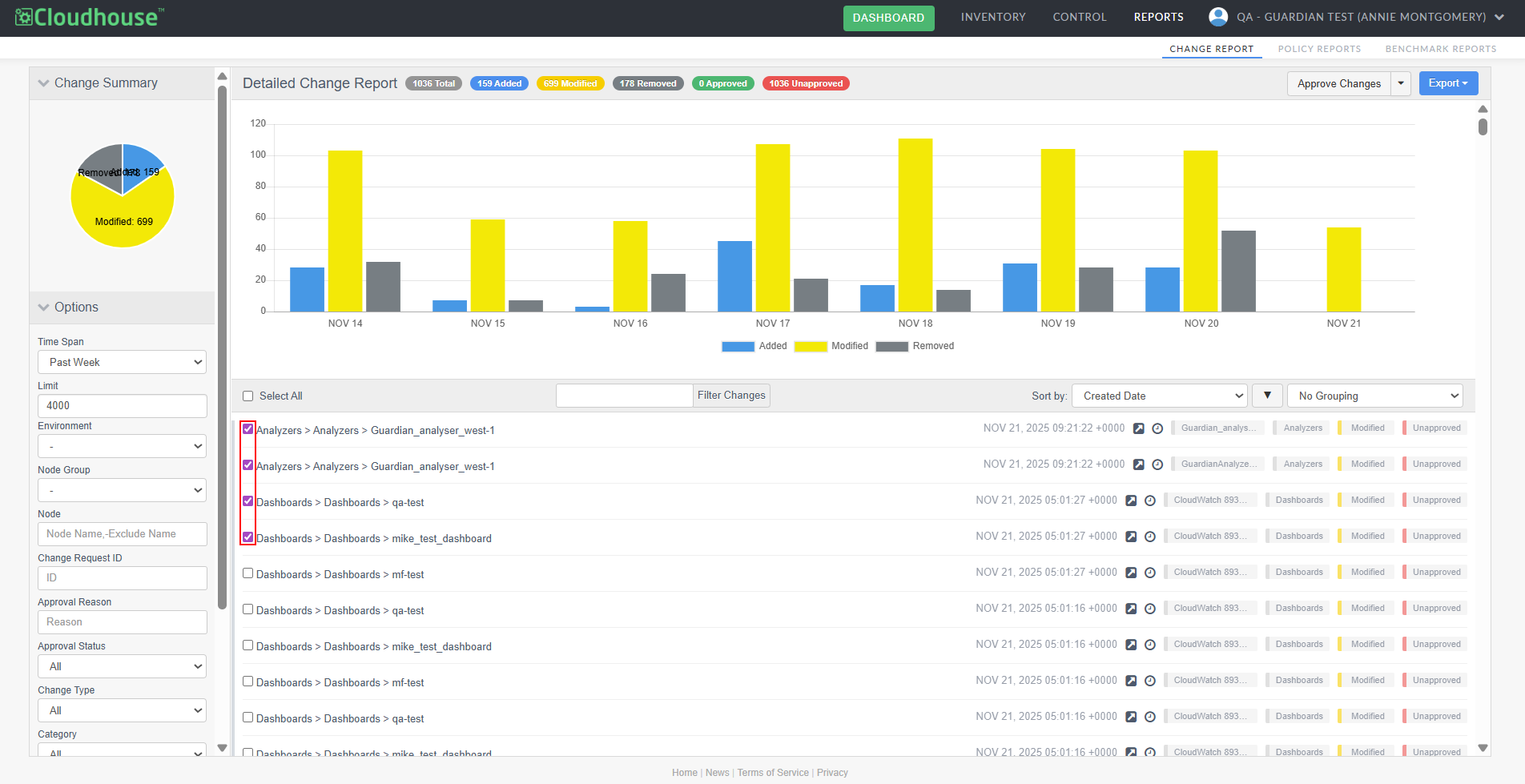
Select the checkbox for each change you want to unignore.
-
Then, click the Approve Changes drop-down and select 'Unignore Changes' from the list of options.
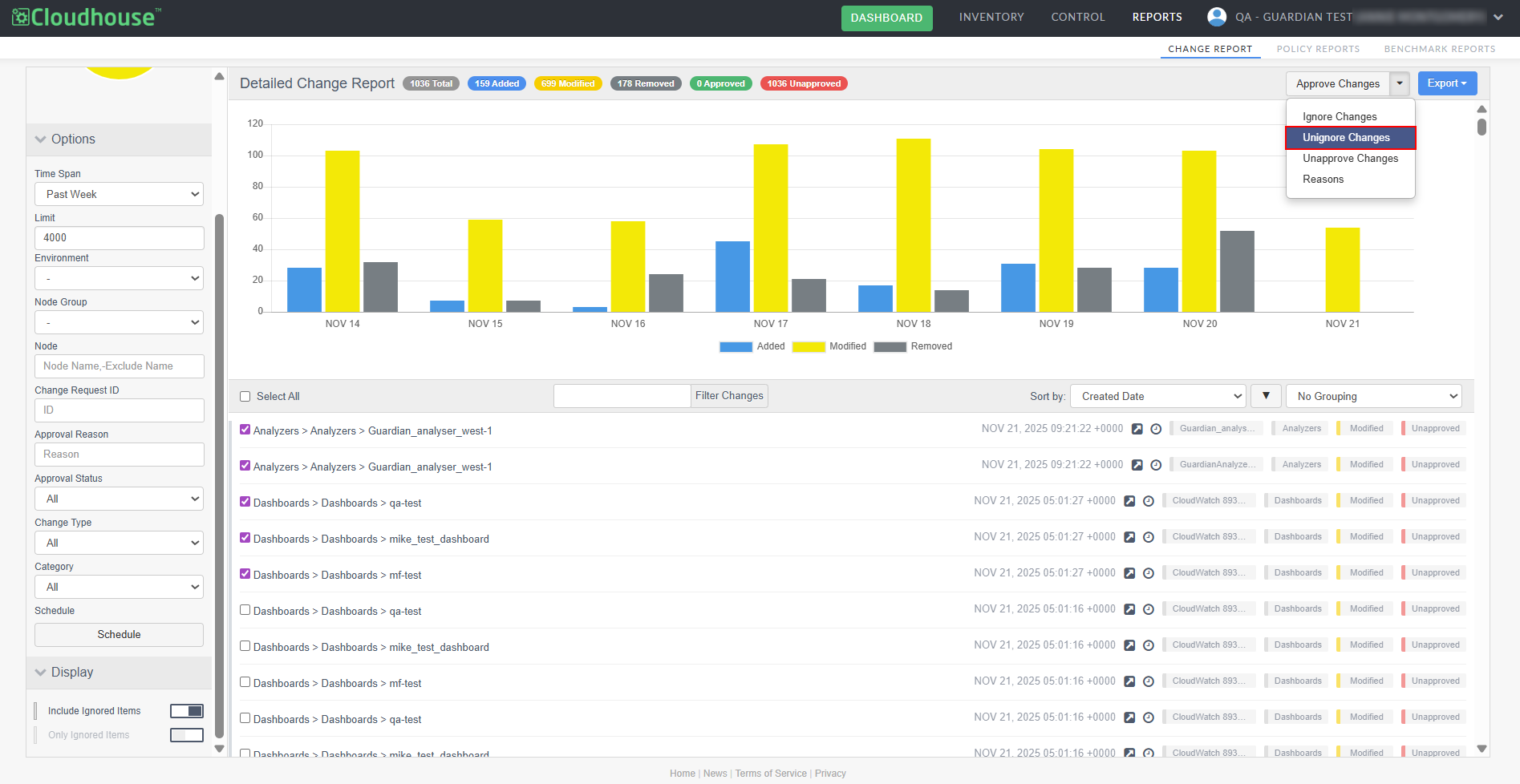
Once complete, the list of ignored items is updated and the options you selected to unignore are added back into the change report's data set.
Other Enhancements
The following additional enhancement is included within this release of the Guardian web application.
Freshservice Integration Improvements
We’ve enhanced the Freshservice integration with Guardian by introducing new configuration fields and statuses within the integration settings page. These additions provide greater flexibility and accuracy when mapping Freshservice change request data to Guardian’s change reconciliation process.
Note: You can access the new fields by editing an existing integration, or adding a new one. For more information, see Freshservice Integration.
The following new fields have been added:
-
Change Start Indicator – Specifies the Freshservice field that represents the planned start date and time of the change.
-
Change End Indicator – Specifies the Freshservice field that represents the planned end date and time of the change.
-
Complete Status – The status number that indicates the change request has been completed.
-
Close Status – The status number that indicates the change request has been closed.
Filter by Change Indicator
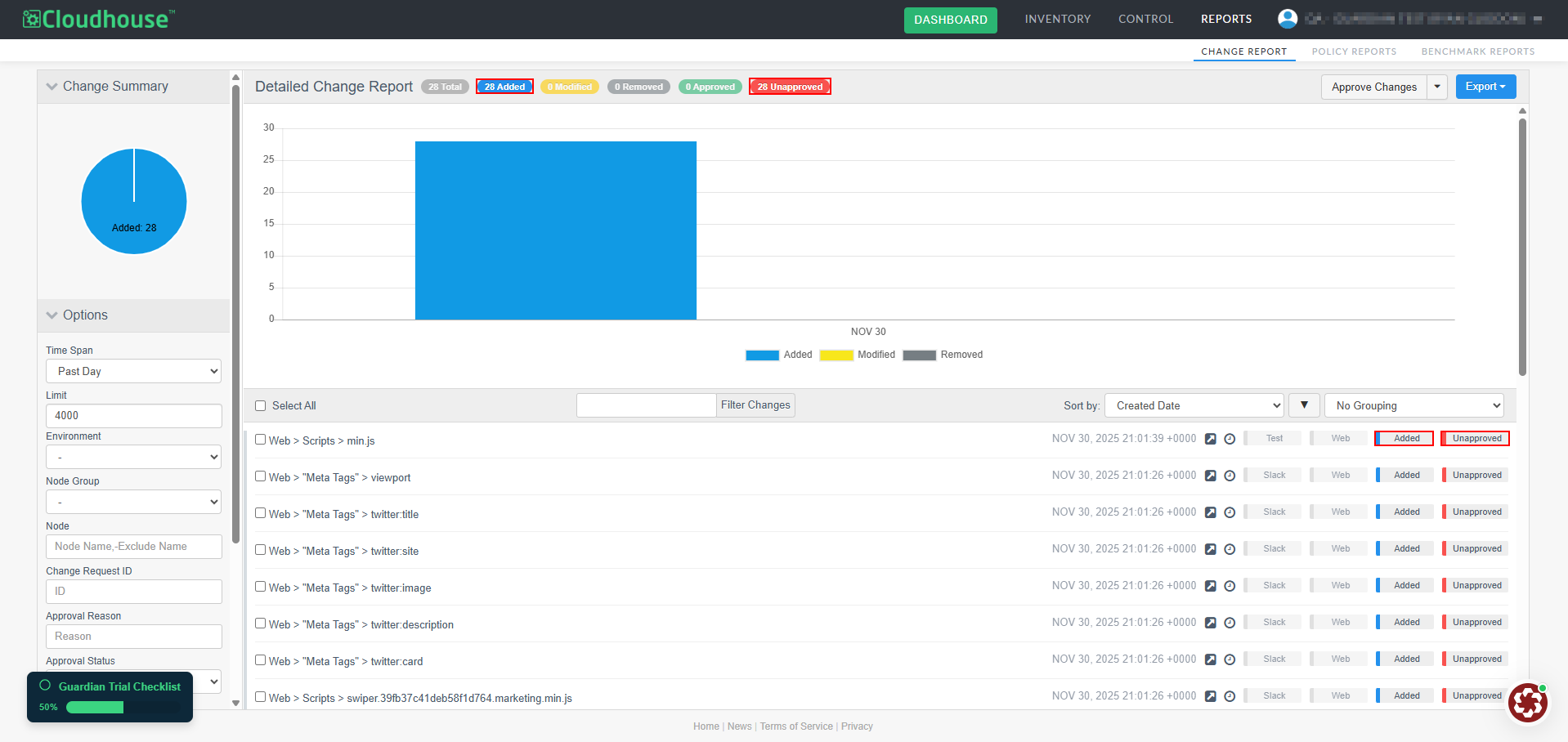
We have now made the change indicators at the top of the Change Report tab interactive. Previously, the change indicators were static and did not allow filtering. This made it harder to quickly narrow down results. Now, you can now click an indicator to filter the report based on that status. Clicking again removes the filter, allowing you to toggle easily without leaving the report.
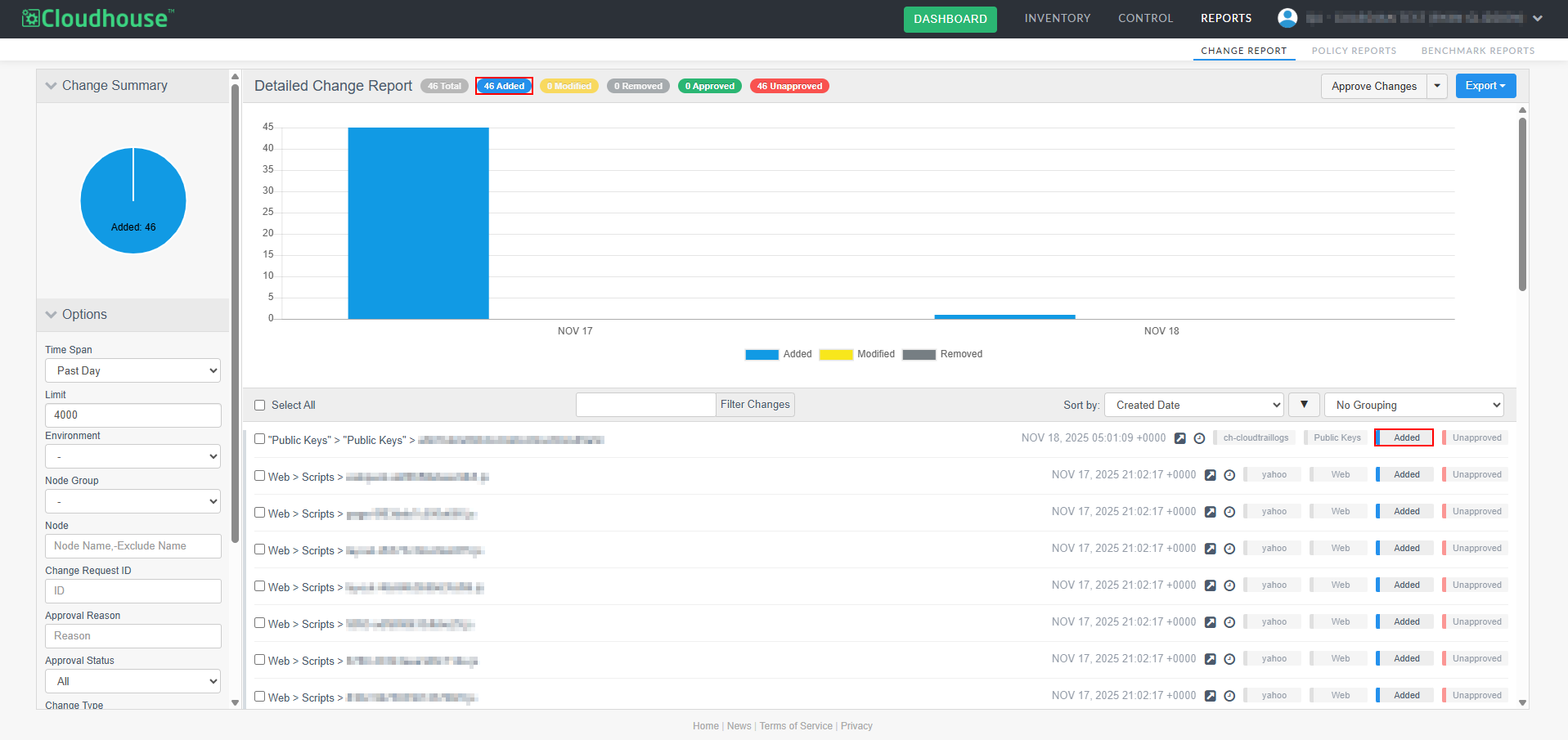
Multiple indicators can be selected at once, so you can refine your view by combining change types (Added, Modified, Removed) with approval status (Approved or Unapproved). This provides a more efficient way to apply filters alongside the Options drop-down menu.
Tip: For more information on filtering a change report, see Group and Filter Changes.
Case-Insensitive Sorting for Lists
We have improved how Guardian sorts items in lists and menus. Previously, all items were sorted alphabetically in a case-sensitive manner, which caused inconsistent ordering. For example, in the Monitored tab, when viewing organizational units such as Node Groups, Environments, and Connection Manager Groups, the options listed within each drop-down menu were sorted alphabetically but treated uppercase and lowercase letters differently.
With this enhancement, sorting is now case-insensitive. Items are displayed in a consistent alphabetical order regardless of capitalization, making lists and menus easier to browse and navigate.
Tip: For more information on sorting a change report, see Sort Change Report by Key Fields.
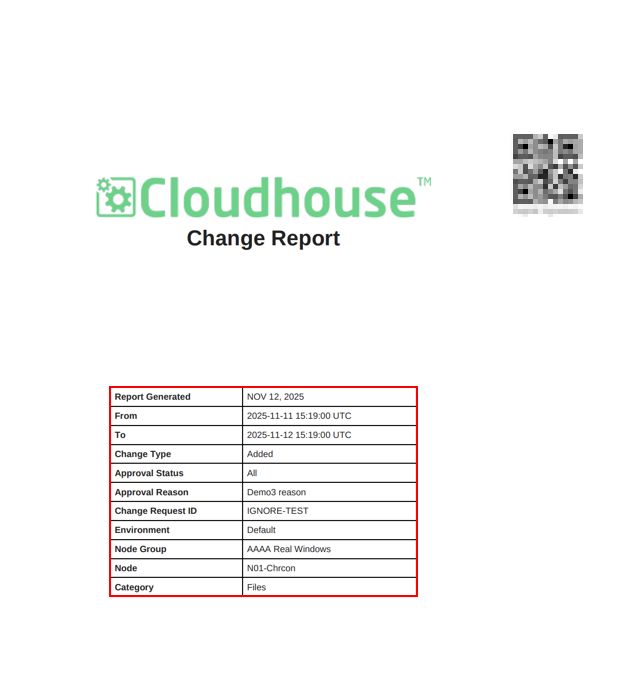
Change Report PDF Cover Displays Applied Filters
When exporting a change report as a PDF, the cover page now includes all filters applied during report generation on the cover page. This enhancement provides greater clarity and ensures the cover accurately reflects the context of the report.
Tip: For more information on exporting a change report to PDF, see Export a Report.
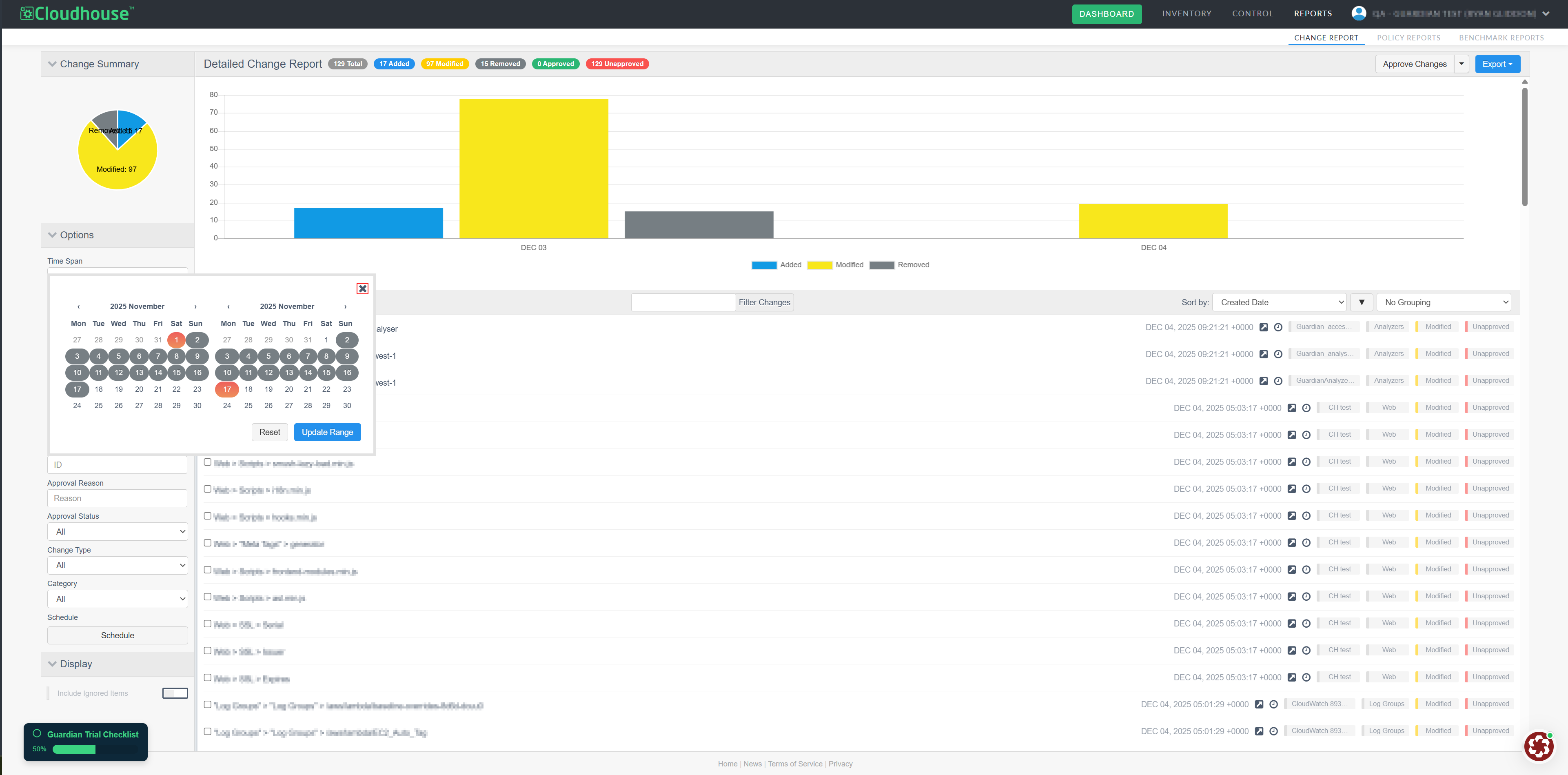
Cancel Date Range Changes
You can now cancel a date range change in the Change Report tab. When you click 'Select Range' in the Time Span drop-down menu and change a date range, you can click X to close the date-picker without applying the new range. The previously applied range remains visible, ensuring your report stays accurate and consistent.
Faster Change Approval
We have improved the speed of approving large volumes of changes, making the process faster and more efficient. Previously, approving large batches of changes could take several minutes and sometimes caused the page to become unresponsive. Now, the process handles large backlogs quickly and reliably, significantly reducing approval times while keeping the page responsive during high-volume selections.
Fixed Issues
The following issues have been fixed within this release of the Guardian web application.
| GWB-6378 – Unable to Correctly Filter Changes Using Search | |
|---|---|
| Affects Versions: V3.60.0 | Fix Version: V3.61.0 |
| Problem: |
In the Change Report tab, when using the Filter Changes search box, Guardian was only filtering results according to the third-level element of the change record's name. For example, in 'Services > Windows > Software Protection', searching for 'Services' or 'Windows' returned no results despite the terms matching the record name. Only searches for 'Software' or 'Protection' returned the expected results. |
| Solution: |
The filter logic has been updated to search across all levels of a change record, including both included and excluded changes. Now, when using the Filter Changes search box, any element of a change record’s name will return the expected results. |
| GWB-5244 – Dynamic Node Groups Not Displaying Nodes from IP Ranges | |
|---|---|
| Affects Versions: V3 (onwards) | Fix Version: V3.61.0 |
| Problem: |
Dynamic node groups created from IP range values (configuration items) were failing to display nodes. The issue occurred because the query logic expected a single flat string, while IP range values were stored as string arrays. This mismatch prevented node group creation and excluded nodes from the group. |
| Solution: |
We have updated dynamic node group queries to correctly handle string arrays. Queries now match values within arrays, enabling dynamic node groups to include nodes based on IP ranges, ports, and protocol combinations. |
| GWB-6386 – Inconsistent Handling of Backslashes in Variables for File Scan Options | |
|---|---|
| Affects Versions: V3 (onwards) | Fix Version: V3.61.0 |
| Problem: |
When using variables in file scan options, backslashes in Windows file paths were not properly escaped. Tip: For more information on scan options for files, see Files in Scan Options. For example:
The backslashes in the variable were consumed, causing the path to break and the scan to fail. |
| Solution: |
We have updated the handling of variables to correctly escape and sanitize backslashes in Windows file paths, ensuring consistency with regular scan options. Variables now resolve to the proper path format, allowing file scan options to work as intended. |
| GWB-6382 – Warning Icon Incorrectly Displayed for Connection Manager Groups | |
|---|---|
| Affects Versions: V3 (onwards) | Fix Version: V3.61.0 |
| Problem: |
A Warning icon ( Tip: For more information on Connection Manager groups, see Connection Manager Groups. |
| Solution: |
The issue occurred because Guardian incorrectly read the number of Connection Managers in each group, defaulting the value to ‘0’ and triggering the Warning icon ( |
 ) was incorrectly displayed for all Connection Managers groups, suggesting that no Connection Managers were present, even though each group contained one or more Connection Managers. This issue was only present on the new
| GWB-6347 – Description Field Inadvertently Made Mandatory | |
|---|---|
| Affects Versions: V3.60.1 | Fix Version: V3.61.0 |
| Problem: |
Previously, in the Change Report tab, when adding an approval reason, the Description field was incorrectly defined as a mandatory field. This meant that you were required to enter text in the Description field, even if no description was necessary. |
| Solution: |
The validation logic has been updated. Entering text in the Description field is now optional. You can now add a reason without providing a description, eliminating the requirement for unnecessary text. |
| GWB-6384 – Expand/Collapse Issue with Multiple Changes | |
|---|---|
| Affects Versions: V3.60.1 | Fix Version: V3.61.0 |
| Problem: |
Previously, in the Change Report tab, expanding certain changes caused the collapse functionality to fail. In some situations, clicking an expanded change did not collapse it, and repeated clicks duplicated the expanded view. |
| Solution: |
The expand/collapse logic has been corrected. Changes now collapse as expected when clicked, even after multiple expansions. This fix ensures smooth navigation and accurate display of change details. |
Linux Agent V5.49.0
Here's what's included in V5.49.0 of the Linux Agent as part of the November 2025 monthly release.
New Features
There are no new features included within this release of the Linux Agent.
Other Enhancements
The following enhancement is included within this release of the Linux Agent.
Enhanced Behaviour for allow_helper_install Configuration Option
The behavior of the Connection Manager when the allow_helper_install configuration option is set to ‘false’ has been modified in this release. Previously this option being false would not only not install the remote helper, but it would also prevent the use of one that might have been placed on the target via some other means. Now, the Connection Manager will make use of a remote helper on the target even if it didn’t install it.
Fixed Issues
No issues have been fixed in this release of the Linux Agent.